
How to Withdraw Your Unetwork Rewards
Your Unetwork license earns UPs (1 UP = 1 USD) continuously while connected. This guide walks you through every withdrawal option, supported networks, fees, and tips for getting your earnings out smoothly.
The best way to withdraw depends on where you live. Right now our focus is the Philippines, so the recommended Philippine method is featured first below. Jump to your country to see the recommended local cash-out method. You can also manage withdrawals from the dashboard at manage.unetwork.io.
Cash Out to Pesos with GCash
The cheapest and fastest way to turn your Unetwork earnings into Philippine pesos is to withdraw as USDT to the crypto wallet inside GCash (GCrypto), then sell it for PHP. The money lands straight in your GCash balance, ready to spend, send, or cash out.
Open GCrypto inside GCash
In the GCash app, open GCrypto. Select USDT, tap Receive, and choose the Tron (TRC20) network. Copy the wallet address or show the QR code. TRC20 is used because it has the lowest network fee.
Withdraw USDT from the Unetwork app
In the Unetwork app, tap Withdraw, choose USDT on the Tron (TRC20) network, and paste the GCrypto address you just copied. Make sure the network is Tron / TRC20 on both sides. Confirm and send.
Wait for USDT to arrive
Your USDT usually shows up in GCrypto within minutes. You will see the balance appear on your GCrypto dashboard once the network confirms the transfer.
Sell USDT for pesos
In GCrypto, tap Sell on your USDT, and convert it to PHP. The pesos are added to your GCash balance instantly. From there you can pay bills, send money, buy load, or cash out at any GCash partner.
Withdraw in Your Country
The pattern is the same almost everywhere: withdraw USDT on the low-fee Tron (TRC20) network, move it to a trusted local exchange, sell it for your currency, then send it to your bank or e-wallet. The Philippines is the smoothest because the crypto wallet (GCrypto) is built right into GCash. Here are the recommended local methods for other key markets.
Indonesia
IDR · rupiahRecommended: Indodax, Pintu, or Tokocrypto (all OJK-licensed exchanges)
- Withdraw USDT on the Tron (TRC20) network from the Unetwork app to your exchange deposit address.
- Sell the USDT for IDR on the USDT/IDR market.
- Withdraw the rupiah to your bank, or straight to GoPay, OVO, DANA, ShopeePay or LinkAja (Indodax supports e-wallet withdrawals).
Good to know: Rupiah withdrawals usually cost about Rp4,500 to Rp10,000. Some banks flag transfers from exchanges, so many users keep a separate account just for cash-outs.
Vietnam
VND · dongRecommended: Binance P2P (deepest VND market, no P2P trading fee)
- Move your USDT (TRC20) from the Unetwork app to your Binance wallet.
- Go to P2P → Sell USDT and filter buyers by MoMo, ZaloPay, or bank transfer.
- Pick a high-rated merchant and release the USDT once the VND lands in your e-wallet or bank.
Good to know: Payment usually arrives within minutes. Only trade with verified merchants that have high completion rates.
Thailand
THB · bahtRecommended: Bitkub (Thailand’s largest, SEC-licensed exchange)
- Withdraw USDT (TRC20) from the Unetwork app to your Bitkub deposit address.
- Sell on the USDT/THB market.
- Withdraw the baht to your Thai bank account or PromptPay.
Good to know: Bitkub charges a 0.25% trade fee and roughly 20 THB per withdrawal under 100k. TrueMoney and Rabbit LINE Pay also work for moving funds.
India
INR · rupeeRecommended: CoinDCX or WazirX (FIU-registered exchanges)
- Withdraw USDT (TRC20) from the Unetwork app to your exchange wallet.
- Sell on the USDT/INR market.
- Withdraw the rupees via UPI or an IMPS/NEFT bank transfer.
Good to know: KYC (Aadhaar or PAN) is required and a 1% tax applies on the conversion. Most exchanges charge no INR withdrawal fee.
Nigeria
NGN · nairaRecommended: A direct-convert platform (Breet, Busha, Quidax, Yellow Card) or Binance P2P
- Withdraw USDT (TRC20) from the Unetwork app.
- Send it to a direct-convert platform that turns USDT into naira automatically, or sell via P2P.
- Receive the naira in your bank account, OPay, or PalmPay.
Good to know: Direct platforms need no buyer interaction. Naira typically reaches your bank within minutes.
Kenya
KES · shillingRecommended: Binance P2P or Yellow Card (both integrate with M-Pesa)
- Move your USDT (TRC20) from the Unetwork app to the exchange.
- Go to P2P → Sell USDT and filter by M-Pesa.
- Confirm the Safaricom SMS once the KES hits your M-Pesa.
Good to know: M-Pesa credit usually arrives in 5 to 20 minutes. Trade only with merchants that have 95%+ completion and lots of trades.
Other countries
Your local currencyRecommended: Any reputable, licensed local crypto exchange that supports your currency
- Withdraw USDT (TRC20) from the Unetwork app to a trusted local exchange.
- Sell the USDT for your local currency.
- Withdraw to your bank account or local e-wallet.
Good to know: Look for an exchange that is licensed or registered in your country and has good liquidity in your local currency. If a direct bank transfer is your only option, expect higher fees and slower settlement.
Withdrawing from the Unetwork App
Outside the Philippines, or prefer to keep your earnings in crypto? Withdraw to any supported wallet using the steps below, then convert to your local currency through your own exchange or wallet.
Open the Unetwork App
Launch the Unetwork app on your phone. Your current UP balance is displayed on the main dashboard. This balance updates continuously as you earn.
Tap Withdraw
Navigate to your earnings or wallet section and tap the Withdraw button. You will see your available balance and a list of supported payout networks.
Choose Your Network
Select which blockchain network or payout method you want to withdraw to. Each network has its own fee structure and processing time. See the full list of supported networks below.
Enter Your Wallet Address
Paste your wallet address for the selected network. Double check the address and network match. Sending to the wrong address or wrong network can result in permanent loss of funds.
Confirm and Send
Review the withdrawal amount, network fee, and destination address. Tap Confirm to submit. Most withdrawals arrive within minutes, though network congestion can occasionally cause delays.
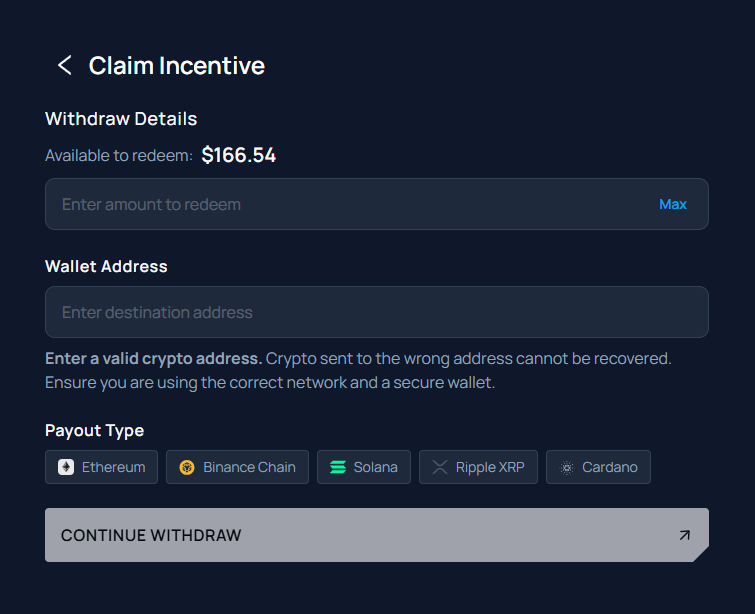
Supported Withdrawal Networks
Unetwork supports withdrawals to a growing list of blockchain networks and tokens. You can also apply for a bank transfer in supported regions.
More tokens are being added regularly. Check the withdrawal screen in the Unetwork app for the most current list.
Bank Transfer (High Fees)
A direct bank transfer is available in supported regions and you can apply for it inside the Unetwork app. It may require identity verification and typically takes 2 to 5 business days. Heads up: bank transfer fees are high. If you are in the Philippines, the GCash route above is almost always cheaper and faster, so treat bank transfer as a last resort or for amounts too large for an e-wallet.
Choosing the Right Network
| Priority | Best Choice | Why |
|---|---|---|
| 🇵🇭 Cash out in the Philippines | USDT (TRC20) → GCash | Lowest fees, settles in minutes, converts straight to pesos in your GCash balance |
| Lowest fees | SOL, XRP, BNB | These networks typically have the lowest transaction fees |
| Stablecoin (pegged to USD) | USDC, USDT | Value stays at $1 regardless of market movement |
| Long term hold | BTC, ETH, ADA | Major assets with established track records |
| World Mobile ecosystem | WMTx, MNTx | Native tokens for World Mobile staking and governance |
| No crypto needed | Bank transfer | Direct to your bank account in local currency |
Withdrawal Tips
- In the Philippines, go through GCash. Withdraw USDT on the Tron (TRC20) network to GCrypto, then sell for pesos. It is far cheaper than a direct bank transfer and the money lands in your GCash balance in minutes.
- Always verify the wallet address. Copy and paste rather than typing manually. Blockchain transactions cannot be reversed.
- Send a small test amount first. On your first withdrawal, send a little, confirm it arrives, then send the rest. This protects you from a mistyped address or wrong network.
- Match the network to your wallet. If you select Ethereum, send to an Ethereum address. Sending to the wrong chain can mean permanent loss.
- Batch your withdrawals. Since each withdrawal incurs a network fee, it is more cost effective to withdraw larger amounts less frequently than small amounts every day.
- Use stablecoins if you want predictable value. USDC and USDT are pegged to USD. Your $48 in UPs will be $48 in USDC. Other tokens fluctuate with the market.
- Keep a small balance for fees. Some networks require you to have a small amount of the native token in your wallet to cover transaction fees when moving funds later.
- Check fees before confirming. Network fees vary by congestion. If fees seem high, wait a few hours and try again.
Withdrawal FAQ
What is the best way to withdraw in the Philippines?
Withdraw your earnings as USDT on the Tron (TRC20) network to the GCrypto wallet inside GCash, then sell the USDT for pesos. The PHP lands in your GCash balance in minutes and you can spend, send, or cash it out anywhere GCash is accepted. This is cheaper and faster than a direct bank transfer, which carries high fees.
How do I move my earnings into GCash?
Open GCrypto in the GCash app, select USDT, tap Receive, and choose the Tron (TRC20) network to get your address or QR code. In the Unetwork app, tap Withdraw, choose USDT on the Tron (TRC20) network, and paste that address. Once the USDT arrives in GCrypto, tap Sell to convert it to pesos. Always confirm the network is Tron / TRC20 on both sides before sending.
Why not just use a direct bank transfer?
Bank transfer is available, but the fees are high and it can take 2 to 5 business days. For most people in the Philippines the GCash route via GCrypto is cheaper and settles in minutes, so bank transfer is best kept as a last resort or for amounts too large for an e-wallet.
Which countries does this guide cover?
We feature the Philippines (via GCash and GCrypto) because it is our current focus, and we also include recommended local cash-out methods for Indonesia, Vietnam, Thailand, India, Nigeria, and Kenya. If your country is not listed, the same approach works almost everywhere: withdraw USDT on the Tron (TRC20) network to a licensed local exchange, sell it for your local currency, then withdraw to your bank or e-wallet.
Why withdraw as USDT on the Tron (TRC20) network?
USDT is a stablecoin pegged to the US dollar, so its value does not swing while you move it. The Tron (TRC20) network has very low transfer fees compared with most other networks, which makes it the cheapest way to move your earnings to a local exchange or wallet. Always make sure the network matches on both the sending and receiving side.
How long does a withdrawal take?
Most withdrawals are processed within minutes. Blockchain network congestion can occasionally cause delays. Bank transfers may take 2 to 5 business days depending on your region and bank.
Is there a minimum withdrawal amount?
Minimum withdrawal amounts vary by network. Check the withdrawal screen in the Unetwork app for current minimums on each supported network.
Are there fees for withdrawing?
Standard network fees apply for blockchain withdrawals. These fees are set by the respective networks, not by Unetwork. Bank transfer fees, if any, depend on your region and provider.
Can I withdraw to a bank account?
Yes. Bank transfer is available in supported regions, but the fees are high and processing takes 2 to 5 business days. Apply for bank withdrawal inside the Unetwork app. Availability varies by country. In the Philippines, the GCash route is usually the better choice.
Do I need to verify my identity to withdraw?
No KYC is required to operate a Unetwork license or withdraw earned UPs to crypto wallets. Bank transfers may require identity verification depending on local regulations.
What happens if I send to the wrong address?
Blockchain transactions are irreversible. Always double check the wallet address and make sure you are withdrawing on the correct network before confirming. Unetwork cannot reverse or recover misdirected transactions.
Do my earnings expire?
No. Earned UPs do not expire. They accumulate in your app balance until you choose to withdraw. There is no lockup period on earned rewards.