Unetwork License (Formerly Unity): The Complete Guide for Operators
The Unetwork app (formerly Unetwork) is now live on Android and iOS. This guide covers everything you need to know to download and activate the app, keep it running smoothly, understand data and battery usage, current costs, and withdraw rewards with confidence.
What a Unetwork license does
A Unetwork License lets your smartphone run controlled verification tasks that probe real telecom networks. The Unetwork app does not route your personal calls or SMS. It dials Unetwork verification numbers, records cryptographic proofs, and helps carriers and enterprises find and fix quality issues. Rewards are funded by service fees paid by network customers, not token emissions. All task results are hashed to World Mobile Chain (WMChain) for on-chain auditability via Proof of Work.
How to get started

The waitlist phase is over. The app is open to anyone with a lease code from a Node Operator. To find an available lease code, visit our lease codes page. No KYC is required to operate a license.
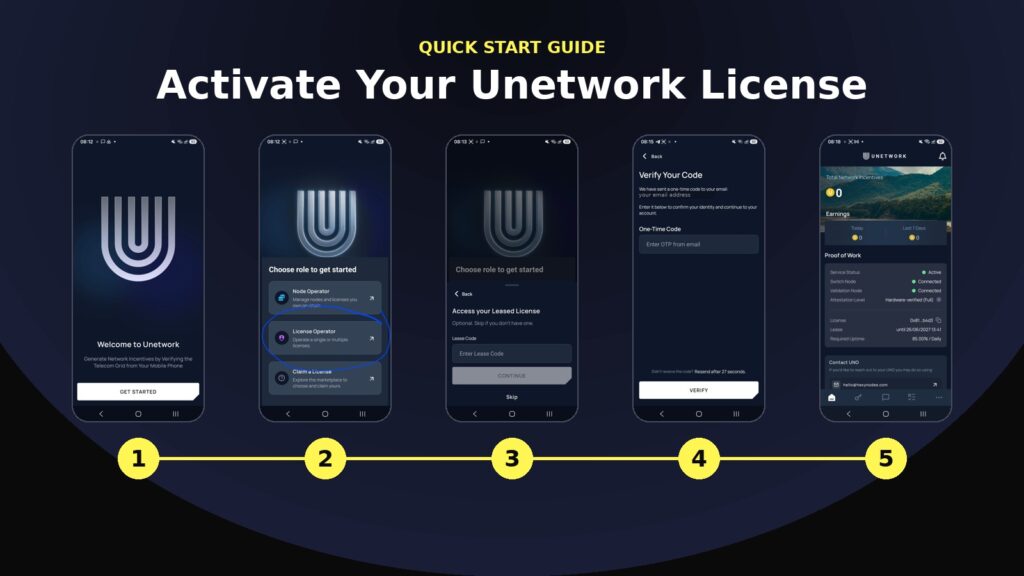
Quick start: download, activate, earn
- Download the app — Android (Google Play) or iOS (App Store).
- Select License Operator in the app and sign in with a Web3 wallet or email + OTP.
- Enter your lease code provided by a Node Operator, then claim a license from the marketplace.
- Bind the license to your device via the Work tab.
- Purchase Unetwork Credits (starting at $1.99/month) to activate your license.
- Keep the app running on Wi-Fi or mobile data. A green Active/Earning indicator means you are earning.
Setup typically takes under five minutes. One device equals one active license — you cannot stack multiple licenses on a single phone.
Video of a Unetwork license operator
Watch a walkthrough of the Unetwork app in action to see what the operator experience looks like from download to earning.
Minimum mobile phone requirements
Operating system: Android 6 or newer, iOS 15 or newer.
Memory: 3 GB RAM or more recommended for smooth background operation.
Connectivity: Stable Wi-Fi or 4G or 5G data. When Wi-Fi is available the app will use that path and avoid mobile data.
Power: Allow the app to run in the background with battery optimizations relaxed, plus a reliable charger for continuous uptime.
The Unetwork app is designed to be lightweight with low CPU and RAM usage, making it suitable for most modern smartphones.
Data use and battery impact
Data only: Unetwork uses data, not voice minutes. On Wi-Fi, mobile data consumption is zero.
How much data: Typical usage is approximately 7 GB per month on mobile data, though this varies with campaign mix and connectivity. Check precise consumption in your phone’s Data Usage settings. Use Wi-Fi whenever possible to minimize costs.
Battery: The app is designed to be lightweight and not CPU or RAM intensive. Real battery draw depends on signal strength and task frequency. Keep the device in a good signal area and on charge for the best result.
If offline: You do not earn while offline. Earning resumes automatically when you are back online.
Where it works
Unetwork works globally on prepaid or contract SIMs and also works on Wi-Fi. It may not operate in places that restrict VoIP or in sanctioned regions listed in the official FAQ. Devices in underserved areas may receive geographic multipliers that boost earnings.
Costs to run a license
| Item | What to expect |
|---|---|
| Monthly license credit | $1.99 to $3.99 USD for an active license. Inactive and unconnected licenses are not charged. |
| Mobile data | ~7 GB/month on mobile data. Use Wi-Fi where possible to eliminate this cost. |
| Power | Plan to charge intermittently if you operate all day for maximum uptime. |
Rewards and withdrawals
Funding source: Service fees paid by network customers — not token emissions.
Updates: Earnings update continuously in the app.
Withdrawals: Withdraw inside the app to a range of supported assets including BTC, ETH, ADA, WMTx, MNTx, DOT, SHIB, USDC, USDT, BNB, and ZEBC. Fiat or bank withdrawal options are available in supported regions. No additional lock applies to earned rewards beyond standard network fees.
Privacy and data
Unetwork states it does not collect your personal content and is GDPR compliant. The system records only the technical data required to verify work, calculate rewards, and provide an audit trail. License operators do not need to complete KYC.
Managing and transferring a license
Licenses are NFTs. They can be transferred or sold by the owner.
Leasing is available with an in-app digital agreement that defines duration, minimum uptime threshold, and the revenue split between Node Operator and License Operator.
Swapping SIMs or phones does not invalidate a license. You can reassign the license to a new device in the app.
Potential monthly earnings estimated at $48 USD per month
Estimated average earnings for a License Operator meeting all participation requirements are approximately $48 USD per month. This is based on a 50/50 split of an underlying gross revenue estimate of ~$96 USD per license per month, derived from nearly a year of network pilots. Daily activity typically generates 0.20–0.40 UPS in the background, with active task periods earning 0.20–2 UPS per task (1 UPS = 1 USD).
These are projections, not guaranteed rates. Actual rewards depend on network demand, task availability, and your uptime.
What we can say today
- Earnings are funded by service fees (not token emissions) and shared with License Operators.
- Your location is generally not the primary factor — uptime and connection quality are.
- Devices in underserved areas may benefit from geographic multipliers.
- Licenses that stay connected and charged around the clock are best positioned to earn.
Costs to factor
- Monthly license credit: $1.99–$3.99 USD per active license (inactive or unconnected licenses are usually not charged).
- Power and device wear: keep the phone plugged in for continuous uptime.
- Mobile data (if not on Wi-Fi): approximately 7 GB/month; use Wi-Fi to minimize this cost.
Maximizing your outcome
- Run on reliable Wi-Fi whenever possible; position the device where signal is strong.
- Allow the app to run in the background; disable battery and data savers for the Unetwork app.
- Keep the device charged and online 24/7 if you can.
- Check the app’s status light for Active/Earning and resolve any issues immediately.
Good Standing & Compliance
To keep your Unetwork License active and earning you must maintain continuous, valid participation. The minimum uptime requirement is 50% — your device must be active and online at least half the time. Node Operators may set stricter thresholds in their individual lease terms.
Your responsibilities
- Stay connected: Keep the device online (Wi-Fi preferred) with stable signal and power.
- Run the app continuously: Allow background activity and disable aggressive battery/data savers for the Unetwork app.
- One device = one license: Do not stack multiple licenses on one phone.
- Operate in permitted regions: Avoid VoIP-restricted or sanctioned locations.
- Meet the minimum uptime threshold: 50% minimum is required. Falling below puts your license at risk.
Warning and enforcement
| Status | What happens | What you must do |
|---|---|---|
| Non-earning / below threshold (first detection) | You receive one warning with basic diagnostics (offline, poor signal, background killed, etc.). | Fix the issue immediately and confirm your status returns to Active/Earning in the app. |
| Still non-earning / below threshold after the warning window | License may be revoked to protect network integrity. If revoked, you may lose access to the license and future earnings from it. | Contact the Node Operator or support before the window closes. |
Quick compliance checklist
- Device plugged in or reliably charged
- Strong, stable Wi-Fi (or 4G/5G) with background data allowed
- Battery optimization turned off for the Unetwork app
- App running and showing Active/Earning
- Operating in permitted regions
- Only one active license on the device
- Uptime above 50% (check in the app)
Fast fixes if you stop earning
- Reopen the app and confirm Active/Earning status
- Move to stronger signal or switch to Wi-Fi
- Turn off aggressive battery/data savers for the app
- Reboot the phone if background services were killed
- Keep the phone on charge during long sessions
Important: As the operator, it is your responsibility to keep the license connected and earning at all times. Consistent uptime and valid work protect your license and the wider network.
Referral program
Unetwork has a referral program with unique codes tied to each Node NFT. The program is described as multi-layered and rewards Node Operators with additional operator licenses for referrals. Full terms and the complete multi-layer structure have not yet been publicly documented in detail. We will update this guide as official details are published.
Frequently Asked Questions
Does Unetwork use my minutes?
No. Unetwork uses data only. When the device is on Wi-Fi it does not use mobile data.
How many licenses can I run on one device?
One active license per device.
What happens when I go offline?
You do not earn while offline. Earning resumes automatically once you are back online.
Where is Unetwork unavailable?
Regions with VoIP restrictions and locations under international sanctions as listed in the official FAQ.
How heavy is the app on battery?
The app is designed to be lightweight with low CPU and RAM usage. Battery draw depends on signal quality and task frequency. Keep the phone in a good signal area and on charge for long sessions.
What does it cost to operate?
Most operators see a monthly credit cost of $1.99 to $3.99 USD per active license. Inactive or unconnected licenses are not charged.
Do I need to complete KYC?
No KYC is required to operate a license. KYC is only required if you want to purchase a Unetwork (which grants 200 operator licenses per node).
Sources
- Unetworks official site and FAQ — unitynodes.io
- Unetwork App on Google Play — play.google.com/store/search?q=unetwork
- Unetwork Litepaper and Rewards Overview — verification model, service fee funding, payout behavior
- Unetwork Official FAQ — app availability, one device per license, Wi-Fi and data behavior, payouts, supported regions, privacy
- Minutes Network AMA — usage patterns, lightweight design, referral program structure, real-time earnings updates
- Polkadot/DOT partnership announcement — October 27, 2025